
A news site lives or dies on speed. When a reader in Warri taps a link on a slow phone network and stares at a blank screen, they do not wait. They go back to Google and click the next result, often a competitor’s.
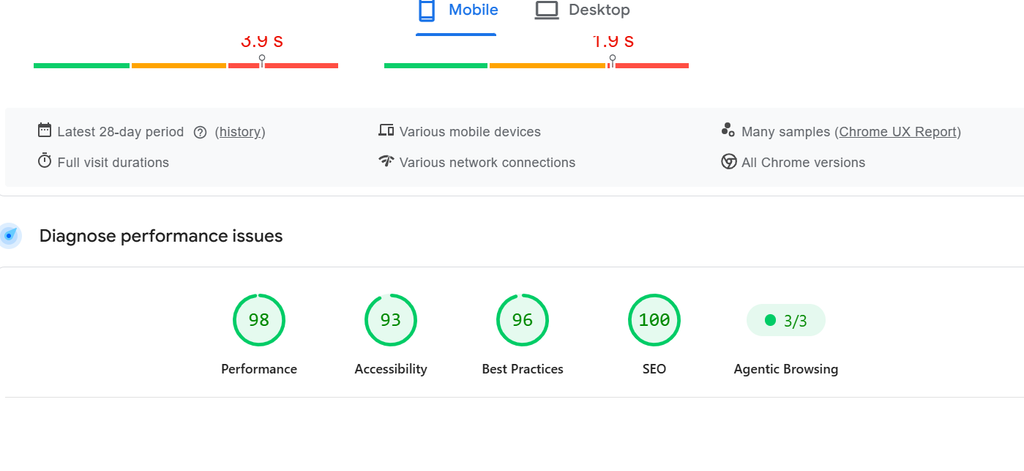
At The Trumpet Newspaper, our site was carrying years of weight: a heavy news theme, a page builder, ten advertising slots, video embeds, sliders and dozens of plugins. Over the past few weeks, I set out to fix that. Working with AI agents in place of a traditional technical team, we rebuilt how thetrumpet.ng loads, and the site now loads about three times faster.
Here is exactly what we did, in the order that made the biggest difference. Most of it applies to any WordPress site.
1. Get caching right first
Before touching anything else, make sure your server is not rebuilding every page for every visitor. thetrumpet.ng runs on Hostinger with the LiteSpeed Cache plugin, and we went through its settings one by one:
- Page cache on, for desktop and mobile. Public pages and the homepage are cached for a week, so most readers get a ready-made page instead of waiting for WordPress to assemble one.
- Object cache on. This stores the results of database queries in memory, which matters on a site with thousands of articles.
- Browser cache raised from seven days to one year. Logos, fonts, stylesheets and scripts rarely change, so returning readers’ phones now keep them instead of downloading them again on every visit.
- Guest optimisation on. First-time visitors get an optimised version of the page immediately.
If you do only one thing from this article, do this.
2. Shrink and tidy your code
News themes ship a lot of CSS and JavaScript that any single page never uses. We switched on LiteSpeed’s tools to deal with it:
- Minify and combine CSS, JavaScript and HTML, so the browser downloads fewer, smaller files.
- Generate unused CSS removal (UCSS), so each page only loads the styles it actually needs.
- Defer JavaScript, so scripts wait until the page content is on screen instead of blocking it.
3. Stop loading scripts the page does not need
This was one of our biggest wins. Our homepage was loading tools that only made sense elsewhere:
- Swiper, a 140 KB slider library from Elementor, even though the homepage no longer used that slider.
- YouTube Embed Plus scripts, needed on video stories but not on the front page.
- Comment-reply, which only matters on article pages.
We wrote a small piece of code that removes these from the homepage only. Articles still get everything they need. The lesson: open your page, look at every script it loads, and ask whether this page really uses it.
4. Fix the biggest image: Largest Contentful Paint
Google measures how long it takes for the largest thing on screen, usually the lead photo, to appear. This is called Largest Contentful Paint (LCP), and it is one of the three Core Web Vitals that affect rankings.
Our problem was ironic: lazy loading, a feature meant to speed things up, was slowing down the one image that mattered most. The featured image sat behind a JavaScript placeholder and only appeared after scripts ran.
So we changed it:
- On every article, the featured image now loads immediately, marked as high priority and preloaded in the page header.
- On the homepage, we replaced the old slider background with a proper image tag with its fetch priority set to high, and preload it, because that hero image is what Google measures.
- Every other image further down the page still loads only when the reader scrolls to it.
We also converted images to modern WebP and AVIF formats with an image optimisation plugin, which cuts file sizes sharply without visible loss in quality.
5. Tame your adverts
Ads pay the bills, but badly set-up ads can wreck a page. We had ten Google AdSense placements across the site (header, article top, in-content, bottom, mobile sticky, archive and more), and each one was set up separately.
The result was that four to six copies of the AdSense loader could fire together, often at the moment a reader first tapped the screen. That made the page feel frozen. Google measures this as Interaction to Next Paint (INP).
We fixed it in two ways:
- AdSense now loads once, shortly after the page has finished loading, instead of many copies at once.
- Every ad slot reserves its space in advance. Before, text would jump down the screen when an ad arrived, which is maddening for readers and is measured by Google as Cumulative Layout Shift (CLS). Now the space is held, and nothing moves.
We kept every ad placement. Revenue did not have to be sacrificed for speed.
6. Small fixes that add up
- Give images a width and height. Our logo had none, so the browser could not reserve its space. We added the real dimensions automatically, removing another source of layout shift.
- Remove connections you do not need. We had told browsers to open early connections to several third-party servers. Once AdSense was loading later, those early connections were wasted effort on slow networks, so we removed them.
- Accessibility and SEO checks. While fixing speed, we also cleaned up issues flagged by Google’s Lighthouse audit, because a fast page that is hard to use still loses readers.
7. Back up everything and change one thing at a time
The most important habit in this whole project was not technical. Before every change, we saved a backup of the old settings: caching options, theme image settings, ad codes and custom CSS. Every custom speed fix lives in its own small file that can be switched off in seconds.
That meant we could try bold changes without fear. When something looked wrong, we rolled it back, measured again and tried a different approach.
What this means for you
You do not need a large technical team to make your site fast. You need a clear checklist and the patience to test each step:
- Turn on proper page, object and browser caching.
- Minify, combine and defer your code, and remove unused CSS.
- Stop loading scripts on pages that do not use them.
- Load your main image first, and lazy-load the rest.
- Load ads once, late, and reserve their space.
- Give every image dimensions and cut wasted connections.
- Back up before every change, and measure after every change.
At The Trumpet Newspaper, speed is now part of how we serve readers, not an afterthought. A faster site means more readers stay, read more stories and come back.
Want the background? Read Is Website Speed a Google Ranking Factor? for the data, How to Fix a Slow WordPress Website, Step by Step for the basics, and Speeding Up a WordPress Site as a Developer for the deeper developer view. If you run a newsroom and want help with the editorial and content side, see my news editing services.
If you run a news site or blog in Nigeria and want to compare notes, follow us on X at @TrumpetNews24.